This platform is private. Access is limited to authorized members of Trainmore and Jammed Room.
or
Signing in...
JAMMED ROOM × TRAINMORE v2.1 · Confidential
TRAINMORE
Brand Platform · v2.0
EV
Foundation · Overview
Train the brand.
This is the Trainmore brand platform — a single, versioned source of truth for every visual, spatial and textual asset. Built for the team, shared with partners, used to launch every new club from the same page.
Concept & Direction
7 Moodboards · 72 Refs
Spatial Renders
Amsterdam Sloterdijk · 5 Views
Toolbox System
43 Elements · 7 Zones
Brand Foundation
Logo · Colour · Type
Quick stats
170+
Assets catalogued
43
Repeatable elements
3
Labels (Regular · Red · Black)
01
Pilot: Amsterdam Amstel
How this platform is organised
Layer
Contents
Who uses it
A — Foundation
Logos, colour, typography, principles, rules. The invariant core.
Everyone. First place to look.
B — Visual Library
72 reference images organised by moodboard zone. Curated inspiration.
Designers, architects, creative partners.
C — Spatial
Moodboards (compiled), Renders (pilot club), Toolbox (43 elements to build).
Build partners, project leads.
D — Applications
Email signatures, social templates, badges, technical spec sheets.
Marketing, HR, procurement, operations.
E — Workspace
Favorites, notes per asset, approval status. Living collaboration layer.
Trainmore team + agency.
Foundation · Logos & Wordmark
The Mark.
The Trainmore wordmark is the heart of the system. A single condensed-cap wordmark — no lock-ups, no variations in proportion. What changes is the context: what it sits on, what surrounds it, what colour it carries.
PRIMARYWHITE ON INK
ALTERNATEINK ON OFF-WHITE
SIGNALWORDMARK ON MAGENTA
TRANSPARENTBLACK · FOR OVERLAYS
INVERTEDINVERTED TREATMENT
Usage rules
Rule
Do
Don't
Clearspace
Minimum of one glyph-height around the wordmark on all sides.
Do not crowd the mark with other graphics or copy.
Minimum size
24 px on screen; 15 mm in print.
Do not reproduce below these sizes — legibility breaks.
Colour
Use only approved colour pairings (white / ink / magenta).
Do not apply gradients, shadows, outlines or photo fills.
Proportion
Always scale uniformly. Lock aspect ratio.
Do not stretch, condense, italicise or rotate.
Placement
Top-left or top-right of the canvas by default.
Do not place over busy imagery without clearspace.
Foundation · Colour System
Colour is a verb.
Magenta is not decoration. Ink is not neutral. Every colour has a role and a ratio. The palette is built around four primary values and four supports — tuned so the system reads the same on a screen, a window sticker, a wall mural or a dumbbell rack.
Primary palette
Core / Ink#0F0E0C
Signal#E8125E
Off-white / Base#F4F0E8
Concrete#5E584D
Supporting palette
OK · System#2C8E68
Warn · System#C07A1E
Alert · System#C23B2E
Muted Sand#9A9183
Ratio of use
60% · Base
30% · Ink
6% · Concrete
4%
Rule of 4. Magenta appears on no more than 4% of any surface — wall, poster, screen, signage. When it grows, it stops signalling and starts shouting.
Foundation · Typography
Condensed and proud.
Three typefaces. One rule: caps are architecture, body is a concession. Display type scales to the size of the room; body type exists only where strictly needed.
Body · DM Sans · 300–700Descriptions, Captions, UI
You don't live to train, you train to live.
We motivate members to train more and get the most out of our gyms by rewarding every workout with a €1 discount. At Trainmore we believe in the power of community and the shared experience of fitness — three labels, one feeling.
These are the decisions that don't get debated again. Everything downstream — materials, type, colour, copy — derives from these six commitments.
01
Urban Honesty
Raw materials, exposed concrete, visible infrastructure. No decorative layers — the building speaks. Every surface earns its place through function.
02
Loud Typography
Condensed caps as architecture. Type becomes the wall, the floor, the ceiling. Scaled to the room, not to the page.
03
Signal Colour
Magenta as a system, not a decoration. Deployed where direction, energy or intensity matters — never as a fill.
04
Playful Friction
Wit in the copy. Pop references, imperatives, inside jokes. The gym talks back. Compliance in the same voice as everything else.
05
Kit of Parts
Every element designed to be reproduced across clubs. Modular, measured, manual-ready. The toolbox is the grammar; each club is a sentence.
06
Three Labels
Regular · Red · Black. A single system, three intensities — tuned to each location's role.
Foundation · Do's & Don'ts
Decisions, already made.
Don't start from zero on every project. These are the recurring choices — already resolved.
Voice
Topic
Do
Don't
Tone
Direct, warm, confident. Imperatives okay.
Avoid corporate softness or fitness-bro posturing.
Copy length
One idea per line. Break for rhythm.
Never write paragraphs on walls.
Language
English-first internationally. Dutch for clubs when relevant.
Don't mix languages within a single asset.
Layout
Topic
Do
Don't
Alignment
Left-aligned as default. Centred only for specific signage.
Never justify long passages.
Grid
8 px baseline, 12-column layout for web / print.
Don't place elements free-floating.
Whitespace
Leave room. Concrete needs to breathe.
Don't fill every corner.
Imagery
Topic
Do
Don't
Photography
Documentary, real members, unposed moments.
No stock imagery. No fitness influencer clichés.
Treatment
Natural grain. Slight warmth in highlights.
No heavy filters, HDR, or fake magenta washes.
Crop
Off-centre, architectural. Let space around bodies.
Don't crop tight on gym equipment alone.
Spatial · Moodboards
Trainmore 3.0 direction.
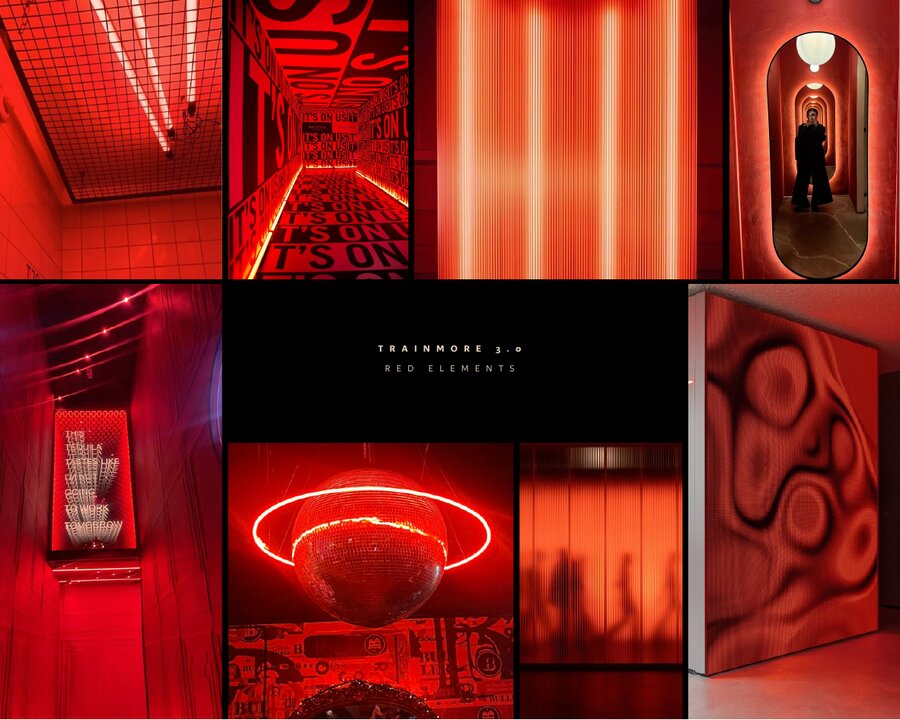
Seven compiled moodboards. Each board crystallises the direction for one spatial zone — the visual foundation from which the pilot builds, materials are chosen, and decisions get locked.
Spatial · Renders
Amsterdam Sloterdijk.
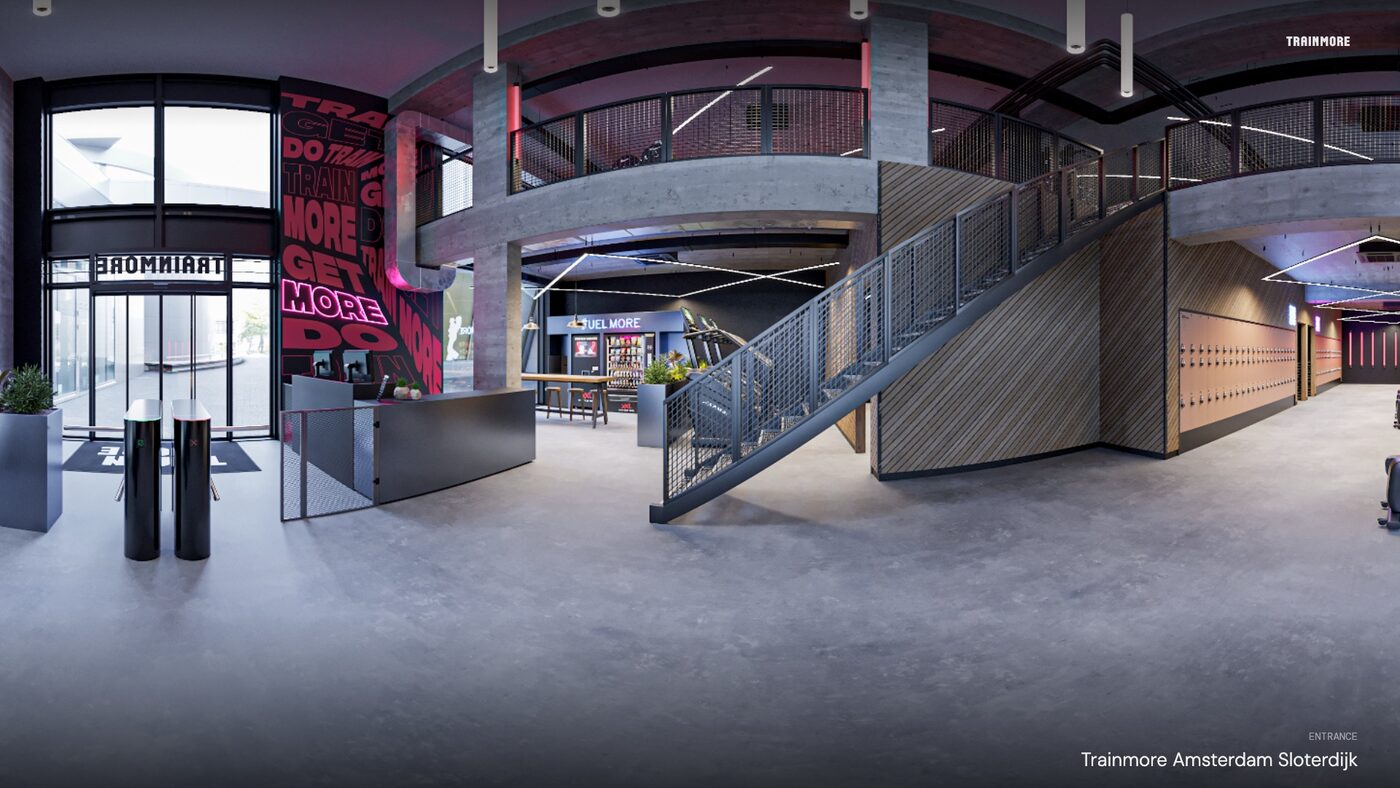
The pilot environment where Trainmore 3.0 becomes architecture. Five CGI views across entrance and cardio zones — the first real application of the new direction, ahead of Amstel.
Spatial · Toolbox System
43 elements, 7 zones.
The repeatable kit-of-parts behind every Trainmore club. Each element is specified, numbered, ready to be re-applied without reinvention. Filter by zone to focus.
Applications · Email Signatures
Signed as a group.
Every Trainmore email reads as part of Urban Gym Group — the parent family of Trainmore · The Clb · CS · Gym Warehouse · Gym Box · Rush · Trib3 · Pilat3s. Four sign-off variants covering horizontal / vertical × light / dark. Drop in your name, deploy across Gmail or Outlook.
Applications · Social Templates
Feed ready.
Five base templates across Stories, Posts and Landscape — tuned to the platforms Trainmore lives on. Editable in Figma; lockable for agencies.
Applications · Badges & Stickers
Small & loud.
Circular badges for social, water-bottle stickers, apparel details, in-app rewards.
Applications · Technical Spec Sheets
Build spec ready.
One-page sheets per toolbox element — material, finish, dimensions, supplier tier. Generated for every element on request; sample specs shown here.
Workspace · My Pack
Your pack.
Cherry-pick assets for a specific project, partner, or moment. Add a pack name and context, then export as PDF (visual or index) bundled with the source files as a ZIP.
Workspace · Favorites
Your shortlist.
Assets you've starred. Each user's favorites are stored locally — share by exporting the list to JSON.
Workspace · All Notes
The conversation.
Every comment left on every asset, in one feed. Filter by author or asset to focus.
Workspace · Approval Board
What's moving.
Overview of asset status. Approved items are ready to deploy; In Review need feedback; Rejected need rework.
Methodology
Our approach
What we're building goes beyond a single project — it's the next chapter of Trainmore as a brand. From spatial identity through to a structured design-and-build system. Structured in three layers, piloted in Amstel, centralised in this platform.
A
Concept & Direction
Refining the vision. Moodboards, spatial narrative, and a clear design language that sets Trainmore 3.0 apart — urban, loud, human.
B
System / Toolbox
Translating the concept into repeatable elements, materials, zoning logic and key principles. Every club built from the same kit-of-parts.
C
Design & Build Manual
Structuring everything into a clear, usable document for internal teams and external partners. The single source of truth.
Amstel pilots it. This platform holds it. Partners build from it.
Documentation
Source files
Core PDFs behind the platform. Shared with approved partners under the Trainmore brand-use agreement.